
You finally got comfortable with ChatGPT.
It took a while. You figured out how to ask it things without getting robotic responses. You built something that sort of works. And then, right on cue, everyone in every Facebook group and every podcast and every coaching community started saying the same thing: you need to switch to Claude.
So now there is a tab open in your browser that you have not clicked on in three days, and a low-level feeling that you are already behind on something you just started.
That feeling is not real. And you are not behind.
Here is what Claude actually is, why people are recommending it, what the differences mean for your specific practice, and, most importantly, what to do first, so you can make a clear-headed decision instead of one driven by FOMO.
At Addo Aesthetics, we do not stay neutral on this one. We use Claude internally and we recommend it to every spa owner we work with as the long-term platform for building AI into their practice. Here is why.
Writing quality. Claude is stronger at matching a specific voice and producing output that sounds like a real person wrote it. For aesthetic practice owners who spend significant time editing AI output until it sounds like them, this matters more than almost any other feature. The problem you have been trying to solve with prompts and instructions, Claude tends to solve more naturally.
Following complex instructions. When you give Claude a detailed, multi-part prompt, it holds all the parts and addresses each one. For operational tasks like building SOPs, structuring training documents, or producing multi-section content, this difference becomes obvious quickly.
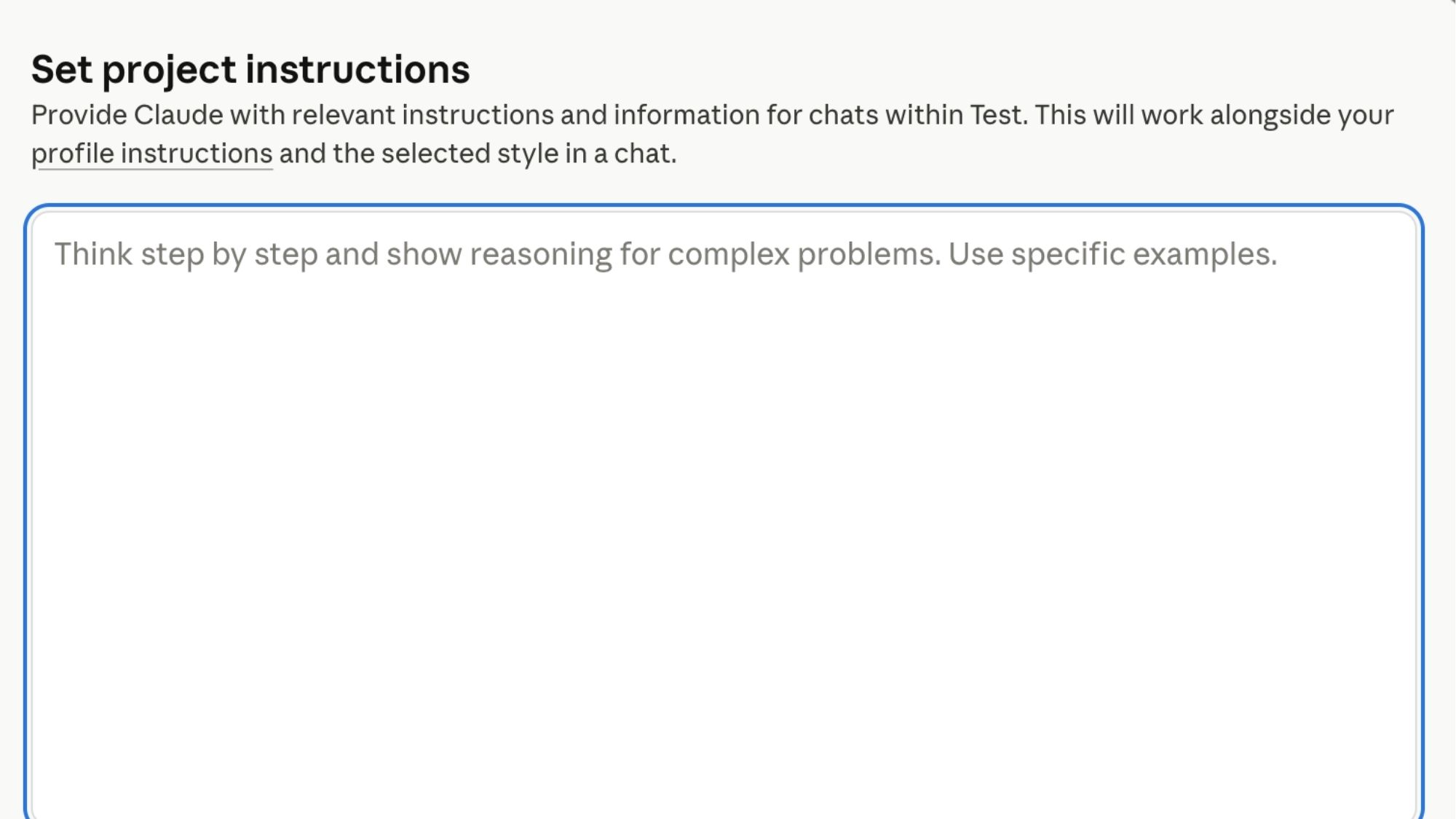
Projects. This is the feature that makes the strongest case for practice owners who are building AI infrastructure. Projects give you a persistent workspace where your instructions, your business context, and your uploaded documents are always available, without pasting them into every new chat. It is the closest thing to a dedicated AI employee that any standard tool currently offers.
Claude Teams. This is the one most people do not know about, and it changes the math entirely.
A $20-per-hour employee gives you roughly 40 hours a week of work. That is $800 a week, or over $40,000 a year for one person who will occasionally call out, have off days, and need time to ramp up on every new task you give them.
Claude Teams starts at $25 per user per month, billed monthly, or $20 per user per month billed annually — with a minimum of five seats. At the annual rate, that’s $1,200 per year for your entire five-person foundation. For that investment, you get something that works at any hour, never calls out, never has an off day, does not need to be retrained on your tone more than once, and gets better at your specific business the more you use it. A copywriter, an HR executive, a marketing director, an operations manager: however you choose to train it.
I personally use both Claude Pro and Claude Teams, and I keep them completely separate on purpose. My Claude Pro account is my personal assistant. I use it for meal planning, family scheduling, household decisions, and personal projects. My Claude Teams account is where I am building and training Addo Aesthetics as a business. Every project I create inside Teams teaches Claude how our company works, what our voice sounds like, who our clients are, and how we make decisions.
The moment you start using your business AI for personal tasks and vice versa, you dilute both. Your business Claude stops being a focused company asset and starts being a general-purpose tool. A general-purpose tool is not an employee. It is just a very smart search engine.
If you are a solo operator planning to stay solo, Claude Pro at $20 per month is a powerful tool and worth every dollar. But if you are building a business with a team, with systems, with a brand that needs to be consistent across every touchpoint, Claude Teams is the infrastructure investment that makes AI work as a real business asset rather than a convenience.
The biggest source of confusion when moving from ChatGPT to Claude is that the same concepts have different names. Here is exactly what maps to what.
Custom GPT = Claude Project
In ChatGPT, a Custom GPT is a purpose-built assistant with its own instructions, personality, and uploaded knowledge files. You might have one for writing Instagram captions, one for drafting client emails, or one for handling common front desk scenarios.
In Claude, the equivalent is a Project. A Project is a dedicated workspace with its own instructions and uploaded documents that stay available across every conversation you have inside it. The concept is the same. The name is different.
GPT Instructions = Project Instructions
Inside a Custom GPT, you write instructions that tell the AI who it is, how to communicate, and what it should and should not do. In Claude Projects, you write the same thing in the same way, in a field called Instructions. If you have instructions saved in your AI Operating Manual, you paste them here exactly as they are.
Knowledge Files = Project Documents
In ChatGPT, you can upload files to a Custom GPT so it can reference them when answering questions or completing tasks. In Claude Projects, you upload documents to the project and they become available to the AI in the same way. Your Voice Document, your Business Context Block, and your Company Bio from Growth Factor® Implementation all live here.
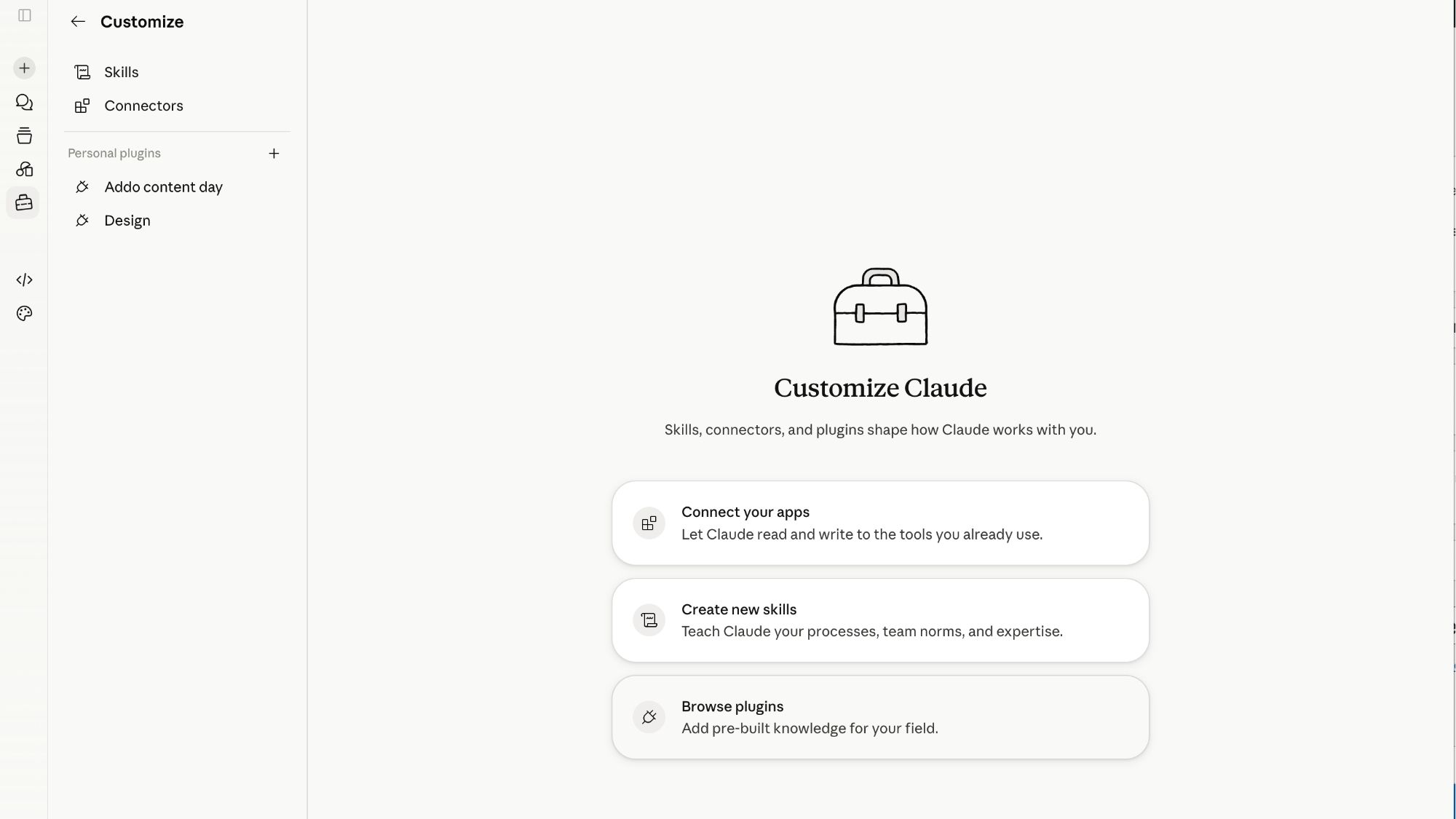
Claude Skills — The Efficiency Advantage
This is the one that confuses people most, and it is also the one that creates the biggest operational advantage once you understand it.
In ChatGPT, knowledge files live inside the specific Custom GPT you uploaded them to. If you build a caption-writing GPT and a patient-email GPT, you have to upload your ICA and Company Bio Documents separately to each one. Every new GPT you build starts from zero. You are re-uploading and re-explaining the same foundational documents over and over.
Claude Skills work differently. A Skill is a saved instruction set or document that can be layered across multiple Projects. Your Voice Document, your brand guidelines, your tone instructions: build them once as a Skill and apply them to every Project you create. Your marketing Project, your front desk Project, your onboarding Project can all draw from the same foundational Skill without you duplicating anything.
As you build more AI employees for your practice, this distinction compounds. In ChatGPT, scaling means re-uploading everything to every new tool. In Claude, scaling means applying existing Skills to new Projects. The architecture is built for a team of AI employees, not just one.

This is the concern we hear most often, and it deserves a direct answer.
If you have spent months building in ChatGPT, you have two things worth preserving: your conversations and context that ChatGPT has learned about you through its memory feature, and any files or instructions inside your Custom GPTs.
Both are transferable.
Transferring your ChatGPT memory:
ChatGPT’s memory feature saves observations about you over time: your preferences, your business context, your communication style. If you have been using it for a while, there is likely useful information stored there that you have never explicitly written down.
To access and export it: go to ChatGPT Settings, select Data Controls, and choose Export Data. OpenAI will email you a download link. Inside that file, you will find your conversation history and your saved memories.
Open the memories file. Review what ChatGPT has learned about your practice and your preferences. Copy the relevant pieces into your AI Operating Manual, specifically your Voice Document and Business Context Block. That information now belongs to you, lives in a document you control, and can be dropped into Claude in the same way it was informing ChatGPT.
Transferring your Custom GPT instructions:
Open each Custom GPT. Go to the configuration. Copy the full text from the Instructions field. Paste it into Section 4 of your AI Operating Manual. That is your transfer. When you are ready to build the equivalent Claude Project, you have everything you need already saved.
You do not have to do any of this on a deadline. Your ChatGPT setup keeps running exactly as it is while you build in Claude at your own pace. The goal is not to abandon what works. It is to make sure nothing you have built is trapped somewhere you cannot access it.
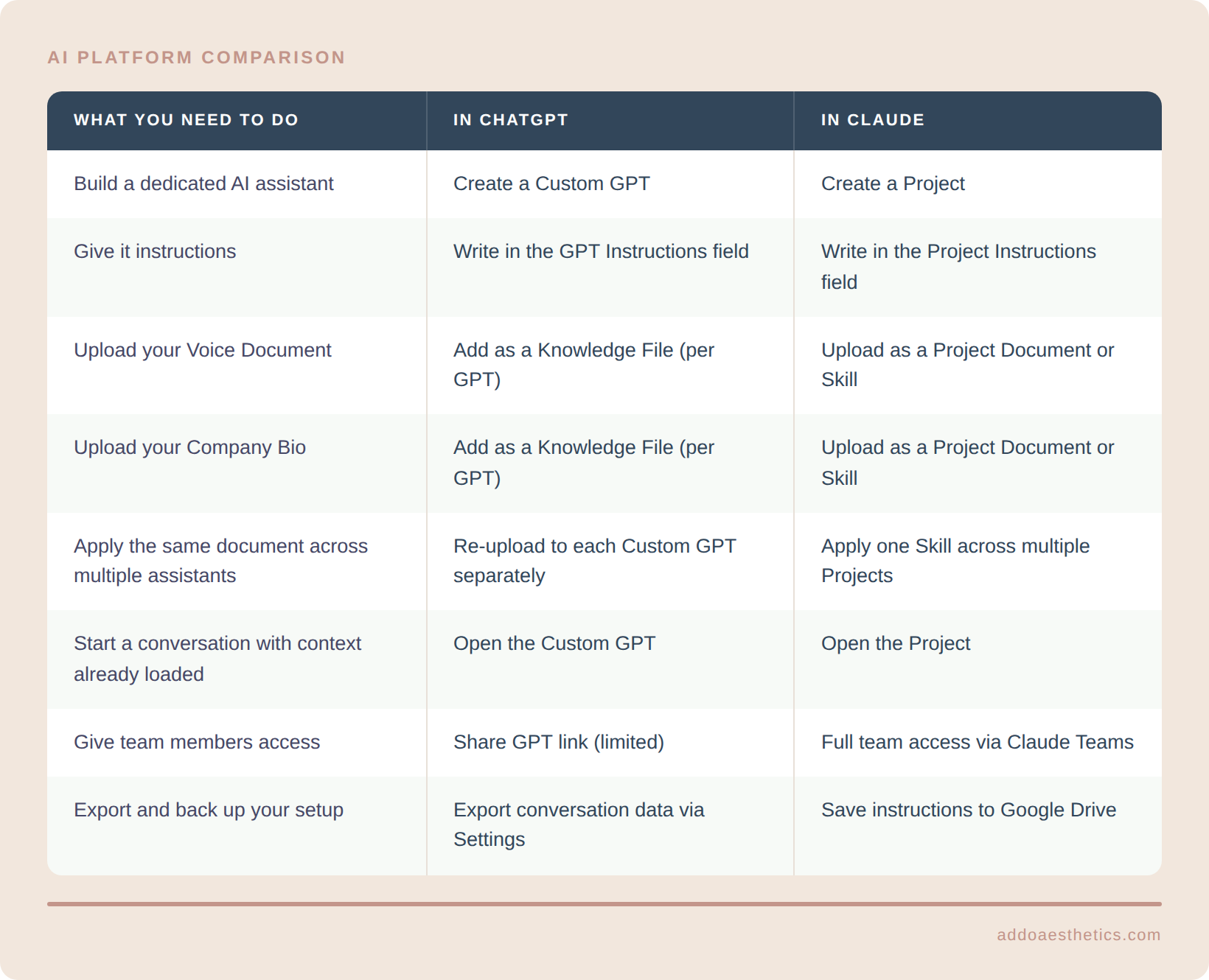
The workflow is the same. The architecture underneath is more scalable in Claude, which is why it becomes the stronger choice as you build more than one AI employee for your practice.
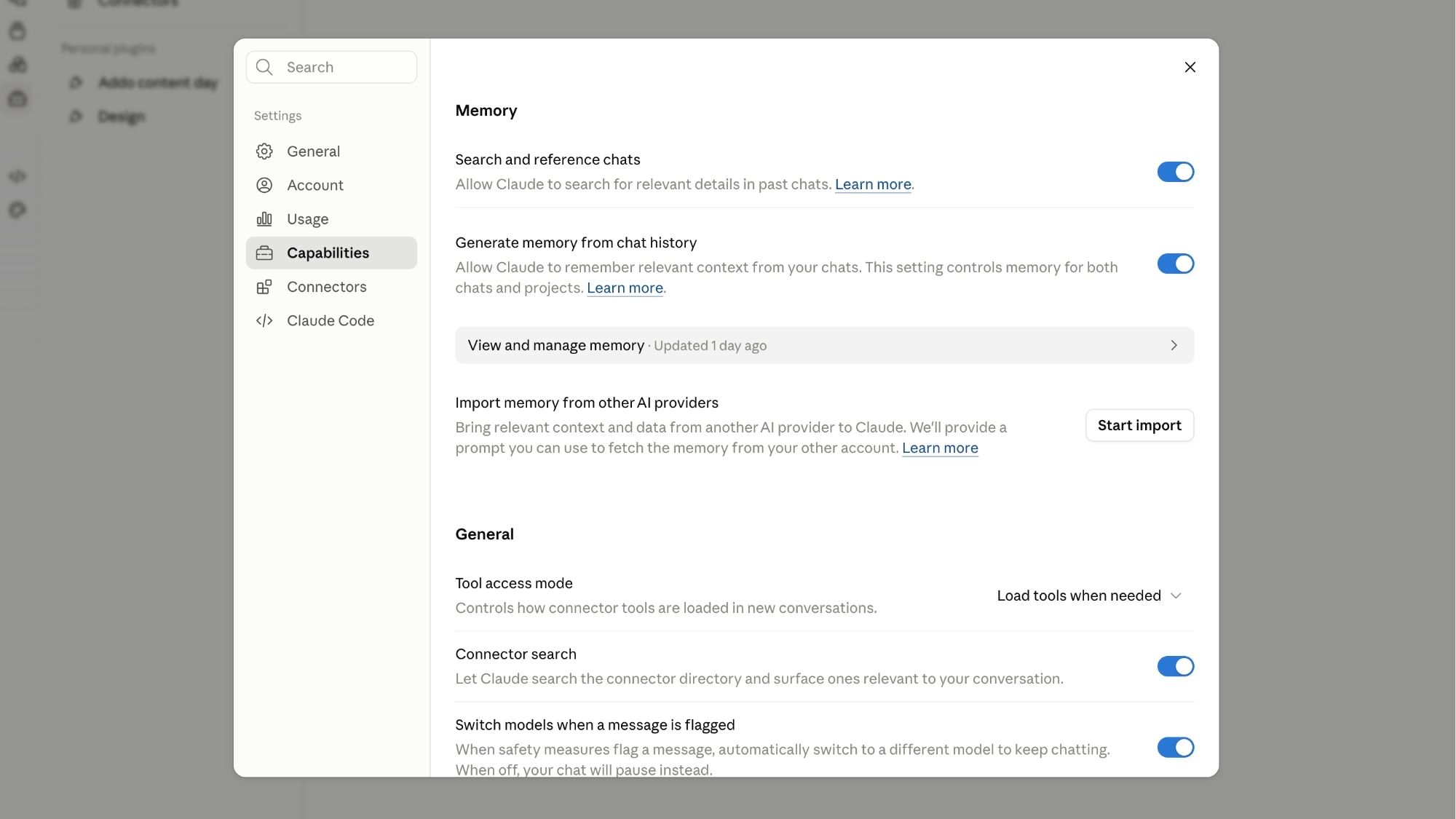
If you have never opened Claude: Open a free account at claude.ai. Do not build anything yet. Paste your Voice Document and your Business Context Block into a new chat and ask it to write your next Instagram caption. Compare the output to what ChatGPT produces with the same inputs. That single comparison will tell you more than any blog post can.
If you have opened Claude but felt lost: Create one Project. Name it something specific, like “Caption Writer” or “Patient Emails.” Write three sentences of instructions telling it what kind of content you want and how you want it to sound. Upload your Voice Document. Ask it to write one piece of content. Start with the task you do most often and that frustrates you most with your current output. Build from there.
If you are actively using ChatGPT and worried about losing your work: Run the export from ChatGPT Settings before you do anything else. Review your memory file. Copy what is worth keeping into your AI Operating Manual. Then open one Claude Project and paste your most-used GPT instructions into it. You are not abandoning anything. You are duplicating it somewhere better.
Regardless of where you are starting: Build the habit of saving every AI asset outside of whichever platform you are using. Every set of Project instructions. Every Skill document. Every prompt that works. All of it lives in a Google Drive folder that you own and control.
The day you want to switch platforms, upgrade your account, bring on a new team member, or hand AI responsibilities to someone else, that Google Drive folder is what makes it a one-hour task instead of starting over from scratch. It is also what we teach inside the Growth Factor® Implementation program as the foundation of a sustainable AI Spa Team — because the businesses that build AI well are the ones that build it on documents they own, not on platforms they rent.
Inside Growth Factor® Implementation, we build something called the AI Spa Team: a set of purpose-built AI tools, each one designed to handle a specific function in your practice, from marketing to operations to team training to client experience. We build these in Claude Projects and Claude Skills because the architecture makes it easier to keep each AI employee focused on its specific role, with its own set of documents and instructions.
But the AI Spa Team is not a Claude feature. It is a system. And systems are built on documents, not platforms. Your Voice Document, your Company Bio, your Ideal Client Avatar, your prompt library: those are what make the AI Spa Team work, regardless of which tool runs them.
Claude makes it easier to build that system well. It is worth learning. And it is worth learning at a pace that does not make you feel like you are dismantling something that already works.
Start with one Project this week. The rest follows from there.

Subscribe to Our Newsletter
Stay up-to-date with our email newsletter to receive important updates, news, and offers!

About the Author
Daniela Woerner is the founder of Addo Aesthetics and creator of the Growth Factor® Framework, a proven system that’s helped hundreds of spa owners build profitable, systemized businesses. With 20 years in the aesthetics industry, she transforms overworked service providers into confident Spa CEOs through strategy, systems, and soul-led support. Daniela is also the host of Spa Marketing Made Easy, a top-ranked podcast with over 1 million downloads, where she shares real-world strategies to help spa professionals grow with clarity and confidence.